RKDevelopTool-GUI
RKDevelopTool GUI
| 中文 | English |
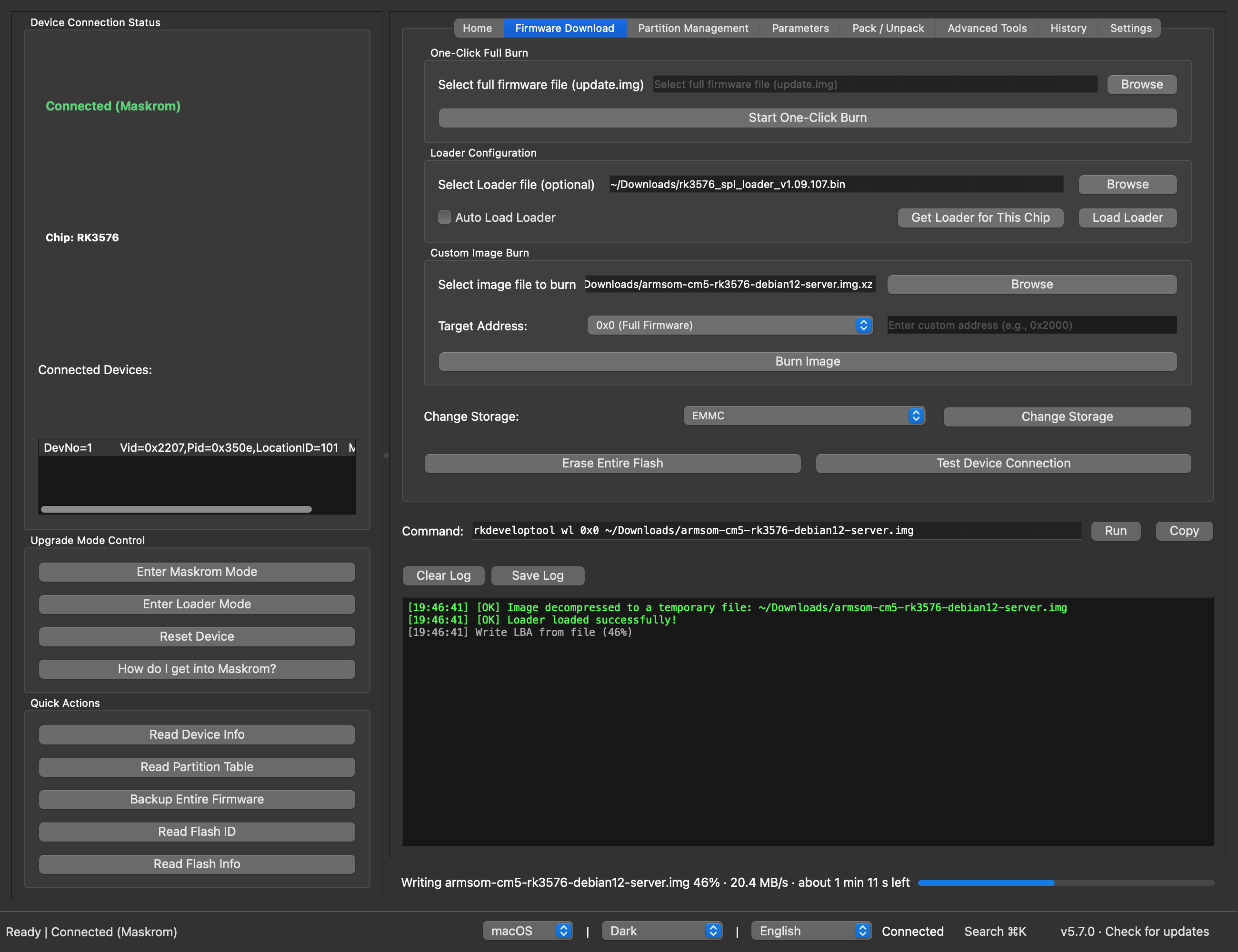
RKDevelopTool GUI is a graphical front-end for Rockchip’s rkdeveloptool, for Linux and macOS. It flashes firmware to Rockchip boards, manages their partitions and recovers them from Maskrom, without the command line. The prebuilt packages include rkdeveloptool.
GitHub: https://github.com/gahingwoo/RKDevelopTool-GUI
Features
Flashing
- One-click flashing of an
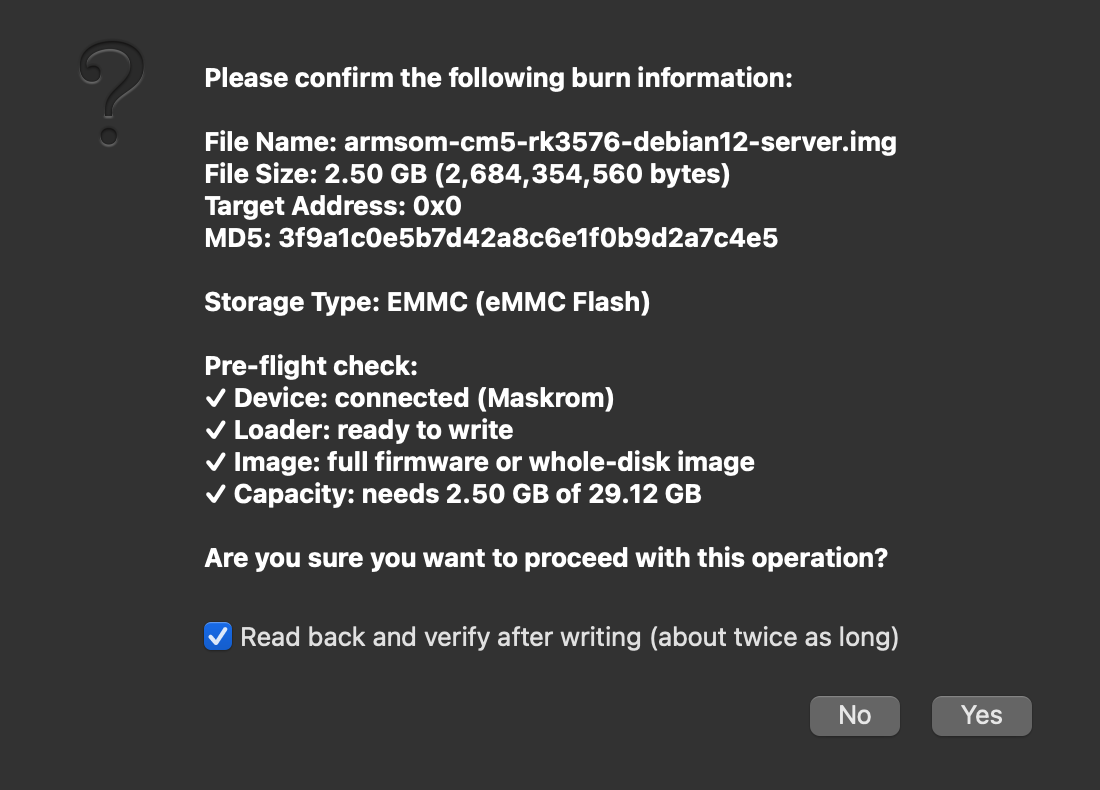
update.img(RKFW, including images over 4 GiB), a raw disk image, or a compressed.img.xz,.img.gzor.img.bz2, which is decompressed first. - A check before every write: device connected, Loader loaded, the right kind of image for the address, and enough storage for it. A failed check stops the write.
- Progress for the whole write with speed and time left, a Cancel button, and an optional read-back verification afterwards.
- An
update.imgbrings its own Loader. For other images in Maskrom mode, the app offers to load yours and picks the right way to do it. - No Loader for your chip? Get Loader for This Chip builds one from Rockchip’s rkbin repository.
- A production line for flashing the same image onto many boards, one after another.
When something goes wrong
- Failures come with the likely cause and what to try, instead of an exit code.
- If the board disconnects mid-write, the app stops and tells you how to recover it.
Everything else
- Drag a firmware, Loader or other file onto the window; it goes to the right field.
- Partition table: read it, then flash, back up or erase single partitions.
- A command line for any rkdeveloptool command, with history.
- A Settings tab: style, theme, language, text size, which rkdeveloptool to use, a default Loader, and where to decompress images.
- Update check against GitHub releases, and Chinese and English.
| Check before writing | Settings |
|---|---|
 |
 |
Install in one line (macOS and Linux)
curl -fsSL https://raw.githubusercontent.com/gahingwoo/RKDevelopTool-GUI/main/install.sh | sh
It picks the right package for your system, checks it against the SHA-256 checksum GitHub publishes, and installs it:
- macOS: the app into
/Applications(no “cannot be opened” prompt this way). - Debian/Ubuntu, Fedora/openSUSE: the
.debor.rpmthrough apt, dnf or zypper (asks for your password); it includes the udev rule, so the board shows up without sudo. - Other Linux, or with
PACKAGE=appimage: the AppImage into~/.local/binwith a menu entry, no root needed.
Read the script first if you like.
Download
Prebuilt packages are attached to every GitHub Release.
They bundle rkdeveloptool, so there is nothing else to install.
| Platform | File |
|---|---|
| macOS (Apple Silicon) | RKDevelopTool-GUI-arm64.dmg |
| macOS (Intel) | RKDevelopTool-GUI-x86_64.dmg |
| Linux (portable, x86_64 / arm64) | RKDevelopTool-GUI-*-x86_64.AppImage / *-aarch64.AppImage |
| Debian/Ubuntu (amd64 / arm64) | rkdeveloptool-gui_*.deb |
| Fedora/openSUSE (x86_64 / aarch64) | rkdeveloptool-gui-*.rpm |
To update, click “Check for updates” in the bottom-right corner. The app also checks by itself at most once a day: one request to the GitHub Releases API, and nothing else is sent. You can turn that off in Settings.
macOS, first launch from the DMG: the app isn’t notarized yet, so macOS says it can’t be opened. On macOS 15 (Sequoia) and later, open System Settings → Privacy & Security, scroll down and click Open Anyway (right-click → Open no longer gets past this). On older versions, right-click the app → Open → Open. Or run
xattr -cr /Applications/RKDevelopTool-GUI.app. This is only needed once: the app’s own updates don’t trigger it.
Linux: USB access
Without a udev rule only root can open a Rockchip device, and the board won’t
show up. The .deb and .rpm packages install the rule, so the logged-in user
has access straight away. With the AppImage or pip, the app notices when the
board is there but can’t be opened, and gives you a one-line command to
install the rule. You can also install it yourself:
echo 'SUBSYSTEM=="usb", ATTR{idVendor}=="2207", TAG+="uaccess"' | sudo tee /etc/udev/rules.d/70-rkdeveloptool-gui.rules
sudo udevadm control --reload-rules && sudo udevadm trigger
Then unplug and replug the board.
Install via pip
Install a standard Python wheel — this adds the rkdeveloptool-gui command to
your PATH. Unlike the prebuilt packages above, the wheel does not bundle
rkdeveloptool, so install that separately (see Running from source
for the requirements).
git clone https://github.com/gahingwoo/RKDevelopTool-GUI
cd RKDevelopTool-GUI
pip install .
rkdeveloptool-gui
Or build a redistributable wheel and install it anywhere:
pip install build
python -m build --wheel
pip install dist/rkdeveloptool_gui-*.whl
Running from source
If you run from source instead of a prebuilt package, you need:
- Python 3.9 or later, PySide6 (Qt 6 for Python)
rkdeveloptoolinstalled and on PATH — verify withrkdeveloptool --version(installation instructions)
From Source
git clone https://github.com/gahingwoo/RKDevelopTool-GUI
cd RKDevelopTool-GUI
pip install -r requirements.txt
python rkdevtoolgui.py
Build Standalone Executable
python build_nuitka.py
./rkdevtoolgui
Arch Linux
Available in AUR:
yay -S rkdeveloptool-gui
Or through a community repository:
sudo pacman -S rkdeveloptool-gui
For the packaging status across more distributions, please refer to Repology
Alternatively, you can install it via a self-hosted package repository
Usage
Flashing a board
- Put the board into Maskrom mode: hold its Maskrom (or Recovery) button while you plug in USB or power it on. The status bar shows “Connected (Maskrom)”.
- Drag the firmware onto the window, or choose it with Browse on the
Firmware Download tab. An
update.img, a raw.imgor a compressed.img.xzall work. - For anything other than an
update.img(which brings its own Loader), choose the Loader for your chip, for examplerk3588_spl_loader_*.bin, and load it when the app asks, or with Load Loader. If you don’t have one, Get Loader for This Chip downloads the parts from rkbin and builds it. - Click Start One-Click Burn. Review the check results and confirm. For a raw or compressed image you can also tick “Read back and verify”.
- Wait for it to finish. The bar covers the whole flash, and Cancel stops it, but a cancelled write has to be flashed again before the board boots.
Many boards
rkdeveloptool works with one connected board at a time, so the production line on the Advanced Tools tab takes boards one after another. Choose the image, click Start Line, then plug in boards in Maskrom mode one at a time. Each board gets its Loader (the one on the Firmware Download tab, or one built from rkbin), a size check, the write, an optional read-back and a reset. When the line says so, unplug it and plug in the next. Results are listed per board.
Partitions
- Load the Loader, then click Read Partition Table.
- On the Partition Management tab, pick a partition and flash, back up or erase it.
Commands
The Command field above the log shows the rkdeveloptool command behind
each button. You can type or edit a command there and run it with Enter, for
example ld, rci or ppt. Commands that write or erase ask first.
Settings
The Settings tab (Ctrl+, or ⌘,) has the style, theme, language and text size, the rkdeveloptool binary to use, a default Loader, where to decompress images, debug logging and the update check. The style, theme and language pickers are also in the status bar.
If something fails
The app explains the most common rkdeveloptool errors: no device found, the device can’t be opened, the wrong Loader, a write that failed. Each comes with what to try, and rkdeveloptool’s own output is under Show Details. To report a problem, use Export diagnostics… in Settings and attach the file to an issue.
Important Notice
This software is a graphical wrapper around rkdeveloptool. Firmware flashing is inherently risky and may result in device bricking or data loss if not performed correctly.
Before using this tool:
- Ensure you have a backup of important data
- Use a reliable USB cable and a stable power supply for the board
- Understand the implications of each operation
- Consult device-specific documentation if needed
The author is not responsible for any device damage, data loss, or other consequences resulting from the use of this software.
Contributing
Contributions are welcome. Please feel free to submit issues or pull requests.
License
See LICENSE file for details.
Support
For issues, questions, or feature requests, please visit: https://github.com/gahingwoo/RKDevelopTool-GUI/issues